Published on TrueBondr | Your safety is not just a feature — it is our promise.
You Deserve to Date Safely. Full Stop.
Online dating has quietly become one of the most natural ways Indian women meet people today. You can take your time, filter before you even say hello, set your boundaries before the conversation even starts. Done right, it is empowering.
But the internet also brings real risks — fake profiles, manipulative behaviour, and people who do not have your best interests at heart. This guide exists not to scare you, but to arm you completely.
Whether you are stepping into online dating for the first time or have been swiping for years, this blog covers everything: the safety features you should know about (including TrueBondr's own Date Mode — a game-changer for women), how to spot red flags before they escalate, and the exact steps to take before, during, and after meeting someone new.
Your safety. Your pace. Your terms. Always.
Part 1: TrueBondr's Date Mode — Built for Exactly This Moment
Before we talk about anything else, let us talk about the feature that sets TrueBondr apart from every other dating app in India right now.
🛡 What is Date Mode?
Date Mode is TrueBondr's dedicated real-time safety system designed specifically for the moment you step out to meet someone. It is your personal safety net — active, intelligent, and connected to the people who matter most to you.
Here is exactly how it works:
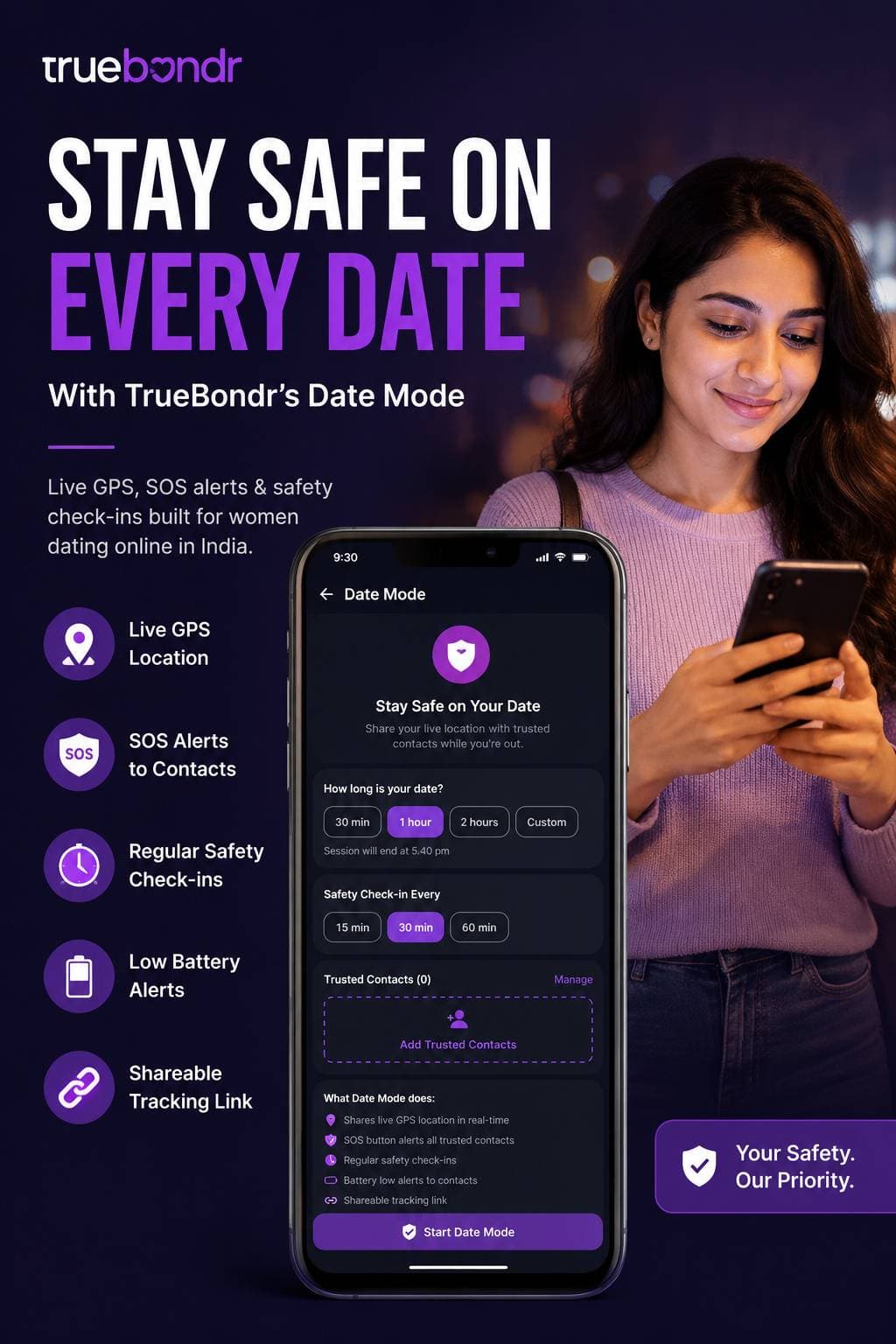
How to Activate Date Mode — Step by Step
Step 1 — Open Date Mode before you leave home. You will find it inside the TrueBondr app. Tap on it before you head out — not when you arrive, not when you are in the car. Do it from the safety of your home.
Step 2 — Set how long your date will be. Date Mode asks you a simple question: How long is your date?
Choose from:
- 30 minutes
- 1 hour
- 2 hours
- Custom (set your own duration)
The app then calculates and displays the exact time your session will end — so your trusted contacts know when to expect your check-in or your "all good" message.
Step 3 — Set your Safety Check-in Interval. This is where it gets powerful. Date Mode will automatically ping you with "Are you safe?" at your chosen interval:
- Every 15 minutes — for high-caution situations or first-ever meetings
- Every 30 minutes — for standard first dates
- Every 60 minutes — for when you feel more comfortable but still want backup
If you do not respond to the check-in, the app escalates — alerting your trusted contacts automatically.
Step 4 — Add your Trusted Contacts. Tap "Add Trusted Contacts" and add the people you want connected to your session — your best friend, your sister, your mum, a colleague you trust. These are the people who will receive your live location and any SOS alerts.
Step 5 — Tap "Start Date Mode" and go. Once active, Date Mode works silently in the background. You date. It watches.
What Date Mode Does in the Background
Once you activate Date Mode, here is what is running for you at all times:
| Feature What it does | |
| 📍 Live GPS location sharing | Your trusted contacts can see exactly where you are in real-time |
| 🆘 SOS button | One tap sends an immediate alert to all your trusted contacts AND triggers a response from the TrueBondr safety team |
| ⏰ Regular safety check-ins | Auto-prompts you at your chosen interval — if you miss one, contacts are notified |
| 🔋 Battery low alerts | If your phone battery drops critically, your contacts are automatically notified so they know to check on you |
| 🔗 Shareable tracking link | You can send a live tracking link to anyone — even someone not on TrueBondr — so they can follow your location in real-time |
The SOS Button — Your Emergency Trigger
The SOS button deserves its own moment. This is not a passive feature. When you tap SOS:
- An immediate alert goes to every trusted contact you have added
- A trigger alert is sent to the TrueBondr safety team
- Action is taken accordingly — the team follows up to ensure you are safe
This is not just an app notification. This is a real response system. Think of it as having a safety team on standby every time you go on a date.
Pro tip: Set up Date Mode the night before your date, not five minutes before you leave. Add your trusted contacts in advance. Test it once so you know exactly where the SOS button is without having to search for it in a stressful moment.
Part 2: The Safest Dating Apps in India (2026)
TrueBondr is not the only app that has invested in women's safety. Here is a quick overview of the most trusted platforms available in India right now.
Bumble — Women Make the First Move
On Bumble, only women can send the first message in heterosexual matches. If you do not message within 24 hours, the match expires — meaning no man can flood your inbox uninvited.
Key safety features: Photo verification, Private Detector (AI blurs unsolicited explicit images before you see them), in-app video call, one-tap block and report.
Hinge — Designed to Be Deleted
Hinge encourages meaningful conversations over casual swiping. Profiles require real photos and detailed prompts, making it harder to stay anonymous.
Key safety features: Selfie verification, phone number required, in-app voice and video calls, dedicated safety centre.
TrulyMadly — Built for India
TrulyMadly has a Trust Score system — users earn higher scores by verifying via Aadhaar, Facebook, LinkedIn, or phone. One of the few platforms designed with the Indian dating context in mind.
Key safety features: Trust Score on every profile, emergency contact feature, ID verification, women's safety helpline.
Aisle — Premium and Curated
Aisle is invite-only with manual profile review before approval — significantly reducing fake or troll accounts.
Key safety features: Manual profile approval, LinkedIn-style professional profiles, phone verification.
TrueBondr — Safety-First Indian Dating
TrueBondr is built for genuine, safety-conscious connections — with Date Mode as its signature feature for women. No other Indian dating app currently offers real-time SOS alerts, automatic safety check-ins, battery low notifications, and a dedicated safety team response in one unified system.
Key safety features: Date Mode (full system described above), trusted contact network, live GPS sharing, shareable tracking link, SOS with team response.
Part 3: Before You Match — Setting Up Your Profile Safely
Your profile is your first line of defence. Here is how to build one without giving away too much.
✅ Do This
- First name only. Never put your last name anywhere on a dating profile.
- Choose photos carefully. Avoid images that show your home, workplace, car number plate, school or college name, or your child's face.
- Use general location settings. Set a radius rather than letting the app pinpoint your exact neighbourhood.
- Create a dedicated email for dating apps that does not include your full name.
- Use the platform's built-in video call before sharing any personal contact details.
❌ Avoid This
- Linking your Instagram or social media directly — it reveals your last name, workplace, and friend circle instantly.
- Using your primary phone number to register — a second SIM or secondary number adds a useful layer of separation.
- Listing your employer or exact college name on your profile before you know someone well.
Part 4: Spotting Fake Profiles and Red Flags Early
Signs of a Fake Profile
- Too-perfect photos — run any suspicious profile picture through Google Reverse Image Search at images.google.com. Paste the image and see if it belongs to a model, stock photo, or belongs to someone else entirely.
- Very few photos — usually one to three, all suspiciously professional or oddly cropped.
- Generic bio — phrases like "love to travel, fun-loving, easygoing" with zero specifics about their actual life.
- Pushes to move to WhatsApp or Telegram immediately — fake accounts want to leave the app's safety ecosystem as fast as possible.
- Story does not add up — claims a high-paying job but cannot explain what they actually do.
- Asks for money — in any form, for any reason, at any stage. No genuine person will ever ask you for money. Walk away immediately.
Red Flags in Conversation
| What They Say What It Often Means | |
| "You are not like other girls" | Classic manipulation — love bombing beginning |
| "Let's move to WhatsApp right away" | Wants to leave the app's safety record |
| "I am not on social media at all" | Cannot be verified anywhere |
| Avoids video call for weeks | Likely fake profile or already in a relationship |
| Asks about your daily routine early | Potential safety concern — do not answer |
| Gets angry when you set a boundary | Control issue — end the conversation |
| "I will come pick you up from home" | Never share your address. Ever. |
Part 5: How to Talk to Someone New — Safely
Phase 1 — Stay on the App (Week 1–2)
Keep all conversation within the dating app. Do not share your phone number, WhatsApp, Instagram, or any other platform until you genuinely feel ready. A person worth knowing will respect this completely.
Natural questions that help you verify:
- "Are you comfortable doing a quick video call on the app sometime?"
- "What does a typical weekend look like for you?"
- "What kind of work do you do?" — keep it casual, see how they respond over time
Phase 2 — Video Call Before Number Exchange
Before sharing your phone number, always do a video call inside the app. This confirms they look like their photos, they are a real person and not a bot or catfish, and gives you a genuine sense of who you are talking to.
Tips for your first video call:
- Use a plain background or virtual blur — do not show your room, building, or view outside
- A genuine person will not mind being on camera
- Keep it short and easy — 15 to 20 minutes is plenty
Phase 3 — If You Exchange Numbers
Use a secondary number if possible. A second SIM card, or apps like TextNow, works well.
Do not share yet:
- Your home address or locality in specific terms
- Your workplace name and address
- Your daily commute route or schedule
Phase 4 — Set Up TrueBondr Date Mode Before You Meet
This is where Date Mode becomes your most important tool. Before you step out the door:
- Open TrueBondr → tap Date Mode
- Set your date duration (30 min / 1 hour / 2 hours / Custom)
- Set your check-in interval (15 / 30 / 60 minutes)
- Add your trusted contacts
- Tap Start Date Mode
Your contacts now have your live location. The SOS button is ready. The safety team is on standby. You can focus entirely on the date itself.
Part 6: Your First Meeting — A Full Safety Checklist
📍 Location Rules
- Always meet in a busy public place — a café, mall food court, or restaurant with good footfall.
- Never agree to be picked up from home on a first meeting. Take your own transport.
- Never go to their home or invite them to yours for the first several meetings.
- Tell at least one trusted person exactly where you are going, who you are meeting, and when you plan to be home.
📱 Before You Leave Home
- Activate TrueBondr Date Mode and confirm your trusted contacts are added.
- Share your live location with a trusted friend via WhatsApp or Google Maps as a backup.
- Save 112 (India's unified emergency number) in your phone's speed dial.
- Charge your phone to at least 80% — Date Mode will alert your contacts if your battery drops critically, but starting fully charged gives you more time.
🚗 Getting There and Back
- Book your own cab — Ola or Uber — and do not share the vehicle details with your date.
- Never get into their car on a first meeting.
- If using public transport, do not let them accompany you all the way home.
🔴 If Something Feels Wrong During the Date
Trust your gut. It is almost always right.
If at any point you feel uncomfortable:
- Excuse yourself naturally — "I just got a message from home, I need to step out for a second."
- Step into the washroom and text your trusted contact or activate the TrueBondr SOS button immediately.
- The SOS alert goes to your trusted contacts AND the TrueBondr safety team — action will be taken.
- Use a pre-arranged code word with a friend before the date — a word that, when texted, means "call me with a fake emergency right now."
- Ask café or restaurant staff for help if you cannot use your phone — most public places are equipped to assist women in uncomfortable situations.
Part 7: Emotional Safety — Protecting Your Heart Too
Watch for Love Bombing
Love bombing is when someone moves very fast emotionally — saying "I love you" within days, calling constantly, wanting to meet immediately, acting as if you are the most perfect person they have ever encountered.
It feels amazing at first. It is often manipulation.
Real connection builds gradually. If someone is rushing you emotionally, slow down deliberately. A genuinely good person will respect that pace without complaint.
You Are Always Allowed to Say No
- No to sharing your number before you are ready
- No to meeting before you feel comfortable
- No to continuing a conversation that makes you uneasy
- No to giving any explanation for any of the above
You do not owe strangers on the internet your time, your attention, or your personal details. Protect these like the valuables they are.
Block Without Guilt, Report with Confidence
If anyone makes you feel unsafe, disrespected, or pressured — block and report immediately. On TrueBondr, reports go directly to the safety team. You potentially protect other women every time you flag problematic behaviour. There is nothing to feel bad about.
Part 8: Digital Safety — Protecting Your Data
Do Not Link Social Media
Connecting your Instagram or Facebook to a dating profile gives strangers access to your friends list, years of photos, your workplace, and your home city. Avoid this completely.
Beware of Fake Verification Links
Some fake accounts send links claiming to be "profile verification sites." Legitimate apps — including TrueBondr — will never ask you to verify through an external link. Do not click. Report immediately.
Screenshot and Save Evidence
If someone threatens you, sends unsolicited explicit content, or harasses you after you block them — screenshot everything before blocking. This evidence is important if you need to report to authorities.
India-Specific Safety Resources
| Resource Contact | |
| National Commission for Women | 7827-170-170 |
| Cybercrime Reporting Portal | cybercrime.gov.in |
| Emergency (Police / Ambulance / Fire) | 112 |
| iCall Mental Health Support | 9152987821 |
| Vanita Helpline | 1091 |
Your Golden Rules — Save This List
- Activate TrueBondr Date Mode before every first meeting — no exceptions.
- Add trusted contacts to Date Mode before you step out the door.
- Know where your SOS button is — it sends alerts to your contacts and the TrueBondr safety team instantly.
- Stay on the app until you are genuinely comfortable sharing contact details.
- Video call before exchanging phone numbers.
- Google their photos using Reverse Image Search before the first meeting.
- Meet in public, arrive independently, and leave independently.
- If you miss a check-in and contacts are alerted — that is the system working exactly as intended. Let it.
- Trust your gut — discomfort is information. Take it seriously.
- Never send money to anyone you have not met in person, no matter how compelling the story.
A Final Word — From TrueBondr to You
Dating as a woman in India in 2026 can be a genuinely wonderful experience. Real connections happen every single day. Good people are out there — and you deserve to meet them.
But your safety — physical, emotional, and digital — comes first. Always.
That is why we built Date Mode. Not as a feature to check off a list, but because we believe that a woman should be able to go on a date and have someone watching over her, even from a distance. Your trusted contacts. Our safety team. All of it working together, quietly, so you can focus on just being present.
Set it up before your next date. You will feel the difference immediately.
Date boldly. Date wisely. TrueBondr has your back.
Share this blog with every woman in your life who is dating online. The more of us who know this, the safer we all are.
© 2026 TrueBondr | This blog is for safety awareness and informational purposes. Always use your own judgement. In any emergency, contact local authorities immediately via 112.